Best Tablets for Digital Planning: iPad, reMarkable, Kindle Scribe and More
 Published
Updated
On this page
- 1. iPad (A16) (Apple, 2025)
- 2. iPad Air (M4) (Apple, 2026)
- 3. iPad Pro (M5) (Apple, 2025)
- 4. iPad mini (A20 Pro) (Apple, 2026)
- 5. Samsung Galaxy Tab S11 (Samsung, 2025)
- 6. reMarkable Paper Pro (reMarkable, 2024)
- 7. reMarkable Paper Pure (reMarkable)
- 8. Kindle Scribe (Amazon, 2025)
- 9. Supernote Manta (Supernote)
- 10. BOOX Note Air6 C (BOOX)
- Honorable Mentions
- Best Tablets for Digital Planning at a Glance
- What These Tablets Have in Common
- Frequently Asked Questions
The best tablet for digital planning depends on how you plan. An iPad runs Goodnotes and Notability, where hyperlinked PDF planners open with tappable tabs. E-ink tablets such as reMarkable Paper Pro and Kindle Scribe trade apps for a paper-like screen, and Android tablets like the Galaxy Tab S11 include a stylus in the box.
Picking a tablet for planning comes down to how a weekly spread fits on the screen, whether the stylus costs extra, how heavy the device is in a bag, and whether the tabs of a hyperlinked PDF actually work. Below are ten current models, with prices read from each maker’s store as of November 2026, followed by the patterns that matter more than any single spec. If you have not chosen an app yet, our Goodnotes vs Notability comparison pairs well with this guide.
1. iPad (A16) (Apple, 2025) #
Contents ↑Released: 2025 | Screen: 11-inch | Stylus: Apple Pencil (USB-C) or 1st generation, sold separately | Works with: Goodnotes, Notability, other iPadOS PDF apps
Apple’s iPad (A16) tech specs list an 11-inch display that measures 10.86 inches diagonally and a weight of 477 grams for the Wi-Fi model. That is enough room for a full weekly spread at a readable size.
The weak spot is the display build. The spec page for the iPad Air, iPad Pro and iPad mini lists a fully laminated display with an antireflective coating; the iPad (A16) page lists neither. Lamination bonds the glass to the display, so ink appears directly under the tip; without it, small handwriting feels a little less direct. The stylus is also an extra purchase: this model supports Apple Pencil (USB-C), or the 1st generation Pencil through a USB-C adapter.
As of November 2026, the iPad starts at $449 on Apple’s U.S. store, plus the Pencil.
2. iPad Air (M4) (Apple, 2026) #
Contents ↑Released: 2026 | Screen: 11-inch or 13-inch | Stylus: Apple Pencil Pro or Apple Pencil (USB-C), sold separately | Works with: Goodnotes, Notability, other iPadOS PDF apps
The iPad Air is the cheapest way to get a 13-inch iPad in the current lineup. According to the iPad Air tech specs, the 13-inch model measures 12.9 inches diagonally and weighs 616 grams, while the 11-inch model weighs 464 grams. That extra screen is the reason to choose it: a two-page planner layout stops feeling cramped.
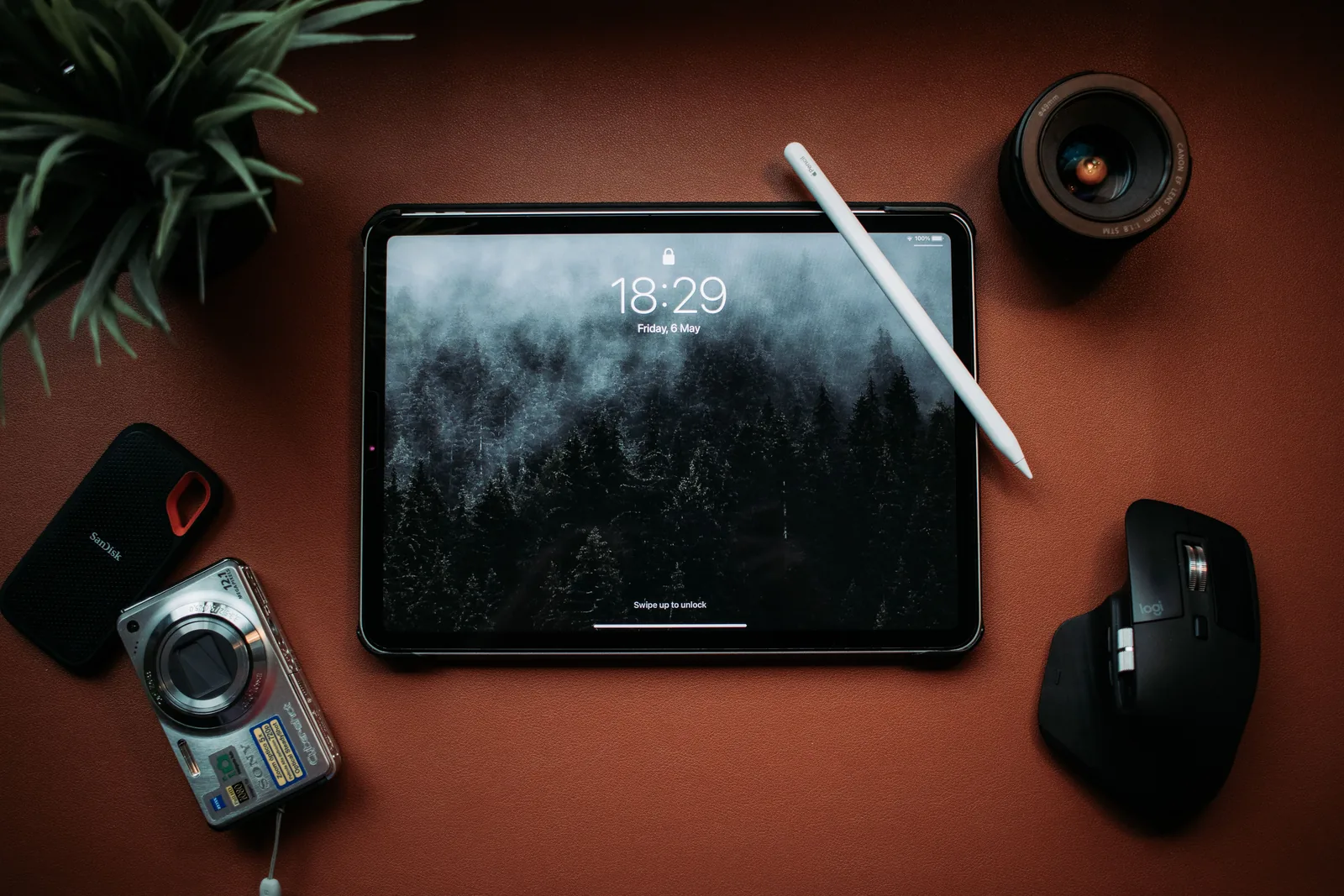
It also brings the fully laminated, antireflective display and support for Apple Pencil Pro, which adds squeeze and barrel roll.
The trade-off is weight. At 616 grams, the 13-inch Air is heavier than every e-ink tablet in this list, so it suits a desk-based routine more than a planner you carry all day. As of November 2026, the 11-inch iPad Air starts at $749 on Apple’s iPad Air store page.
3. iPad Pro (M5) (Apple, 2025) #
Contents ↑Released: 2025 | Screen: 11-inch or 13-inch | Stylus: Apple Pencil Pro or Apple Pencil (USB-C), sold separately | Works with: Goodnotes, Notability, other iPadOS PDF apps
The iPad Pro is the lightest large iPad. Apple’s iPad Pro tech specs list 579 grams for the 13-inch Wi-Fi model, about 37 grams less than the 13-inch iPad Air, and a ProMotion display with adaptive refresh rates from 10Hz to 120Hz. A higher refresh rate updates the screen more often while the Pencil moves.
For planning alone, the Pro is hard to justify. A PDF planner does not need the M5 chip, and the features that matter most (a laminated screen, Apple Pencil Pro support, a 13-inch size) are also on the iPad Air. As of November 2026, the 11-inch model starts at $1,199 on Apple’s iPad Pro store page, $450 more than the 11-inch Air. It makes sense only if the tablet also handles drawing or video work.
4. iPad mini (A20 Pro) (Apple, 2026) #
Contents ↑Released: 2026 | Screen: 8.5-inch | Stylus: Apple Pencil Pro or Apple Pencil (USB-C), sold separately | Works with: Goodnotes, Notability, other iPadOS PDF apps
The iPad mini is the carry-everywhere option. The iPad mini tech specs list a screen that measures 8.5 inches diagonally and a weight of 255 grams, less than half of the 13-inch iPad Air. Apple also rates this model IP67 for splash, water and dust resistance, a useful detail for a planner that rides in a bag next to a water bottle.
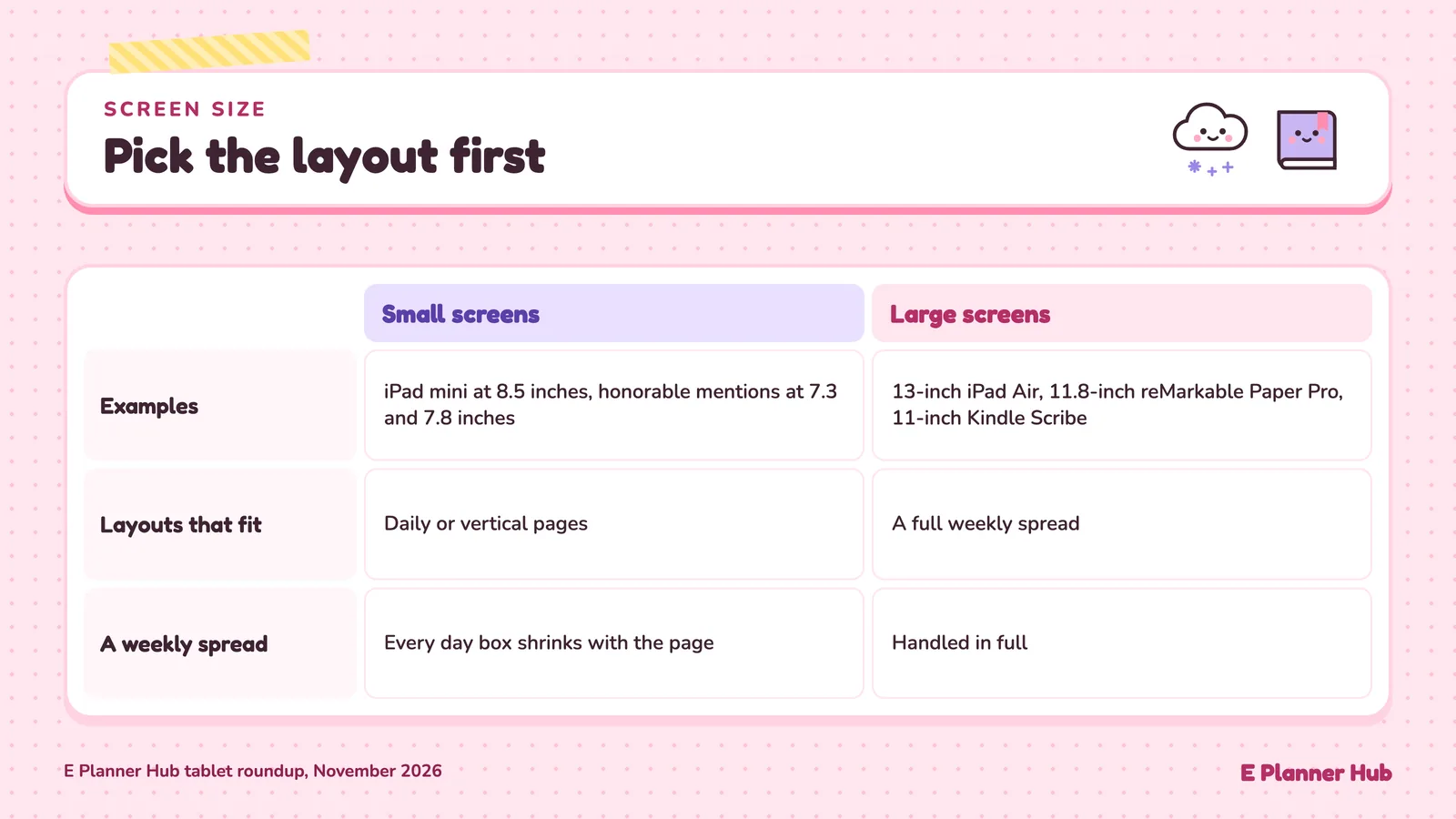
The screen size is also its main limit. Many hyperlinked planners are designed for a full-size iPad, so a weekly spread shrinks and each day box gets tight. Daily pages and vertical layouts suit the mini better.
The mini supports Apple Pencil Pro and has a fully laminated display, so writing feels the same as on the Air, just on a smaller page. As of November 2026, it starts at $699 on Apple’s iPad mini store page.
💡 Pro Tip
Before you buy, check the page size of the planner you plan to use. A landscape weekly spread made for a 12.9-inch iPad will open on an 8.5-inch iPad mini, but every day box shrinks with it. If the planner shop offers a portrait or mini version, that is a sign it was built with smaller screens in mind.
5. Samsung Galaxy Tab S11 (Samsung, 2025) #
Contents ↑Released: September 2025 | Screen: 11.0-inch | Stylus: S Pen, included | Works with: Samsung Notes, Android PDF apps
The Galaxy Tab S11 stands out on Android because the stylus comes in the box. Samsung’s launch announcement lists an 11.0-inch display at 2,560 x 1,600 and an S Pen in the box, with availability from September 4, 2025. Compared with an iPad, that removes a $79 to $129 accessory from the total cost.
Samsung Notes is built in, and Samsung’s Galaxy Tab S11 page describes S Pen tools such as Quick Tools and sticky memos inside Samsung Notes. For PDF planners, Android also opens the door to other annotation apps from Google Play.
The catch is that many planner tutorials are written for iPad apps, so menu names in guides may not match Android. As of November 2026, the 128GB Wi-Fi model is listed at $999.99 on Samsung’s U.S. store.
6. reMarkable Paper Pro (reMarkable, 2024) #
Contents ↑Announced: September 2024 | Screen: 11.8-inch color e-ink | Stylus: Marker, included | Works with: PDF and EPUB import, reMarkable apps
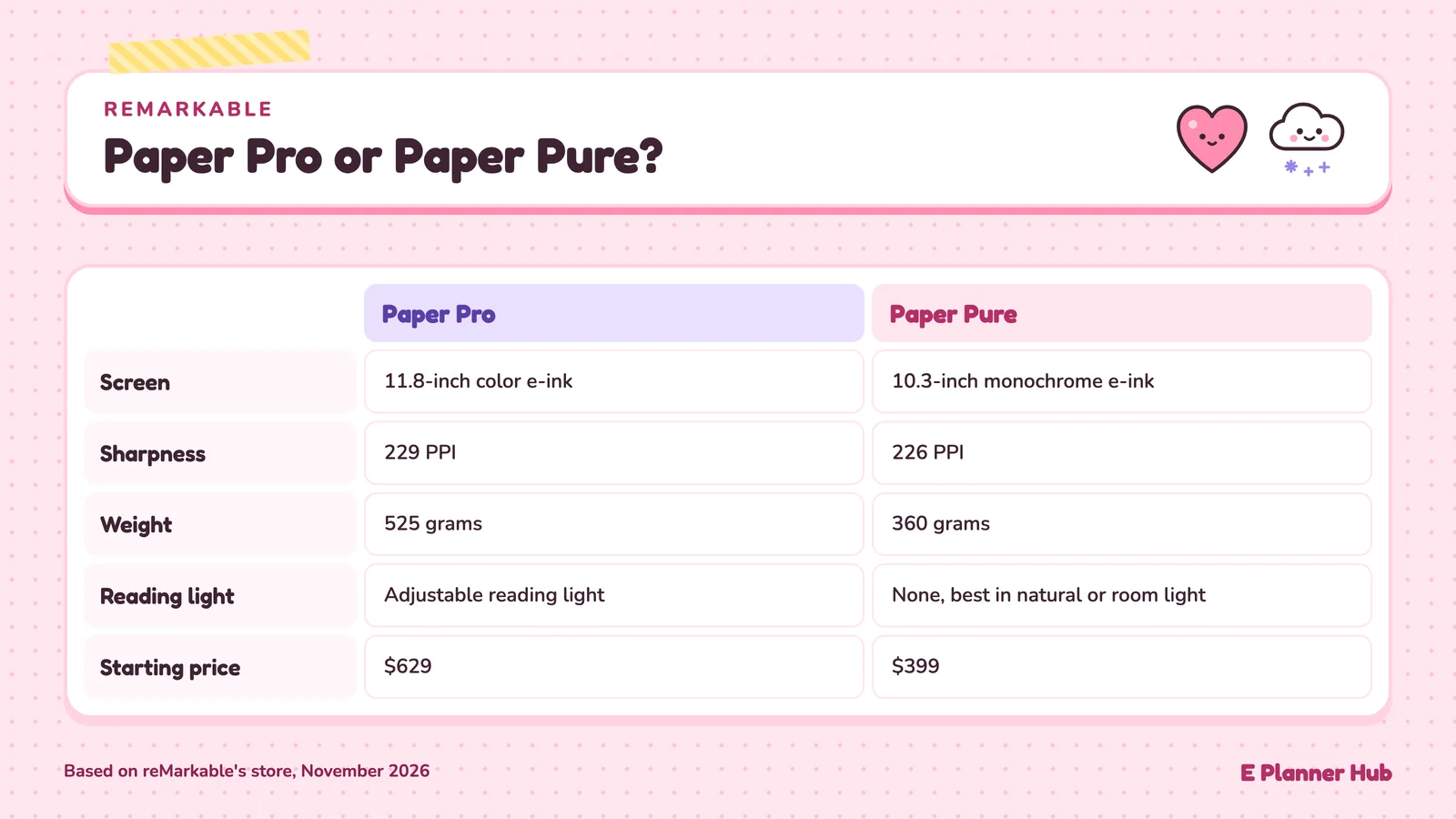
reMarkable unveiled the Paper Pro on September 4, 2024, with an 11.8-inch color display and an adjustable reading light. The reMarkable Paper Pro is listed at 229 PPI and 525 grams, with the Marker included.
reMarkable supports internal navigation links in PDFs, so an index tab can jump to the right month, and color-coded categories stay visible.
The limit is software choice. You import the planner as a PDF and write with reMarkable’s own tools rather than inside Goodnotes or Notability, so steps from iPad planner tutorials will not carry over. Extras such as handwriting search and unlimited cloud storage come with the Connect subscription, which the reMarkable store lists at $3.99 a month after a 50-day free trial. As of November 2026, the Paper Pro starts at $629 on that store.
📌 Did You Know?
reMarkable added internal navigation links in PDFs in its software update 2.6, published in March 2021. Before that update, tapping a planner tab on the device did not jump to the linked page. Keep the device updated before you import a hyperlinked planner.
7. reMarkable Paper Pure (reMarkable) #
Contents ↑Screen: 10.3-inch monochrome e-ink | Stylus: Marker, included | Works with: PDF and EPUB import, reMarkable apps
The Paper Pure is reMarkable’s most affordable tablet and the successor listed on the page for the discontinued reMarkable 2. The reMarkable Paper Pure features page lists a 10.3-inch monochrome Canvas display, and the store comparison lists 226 PPI and 360 grams. That is 165 grams lighter than the Paper Pro.
It keeps things simple: black and white, a Marker that snaps in place and charges wirelessly, and the same PDF import as the Paper Pro. Color coding disappears, so it suits people moving from a plain paper notebook.
There is no reading light. reMarkable’s own store notes that the Paper Pure works best in natural or room light, so evening planning under a dim lamp is harder than on the Paper Pro or an iPad. As of November 2026, it starts at $399 on the reMarkable comparison page.
8. Kindle Scribe (Amazon, 2025) #
Contents ↑Announced: September 2025 | Screen: 11-inch e-ink | Stylus: pen, included | Works with: Send to Kindle PDFs, Kindle notebooks
Amazon’s Kindle Scribe announcement from September 30, 2025 describes an 11-inch glare-free display, a 5.4 mm body and a weight of 400 grams. The included pen attaches to the device and never needs charging.
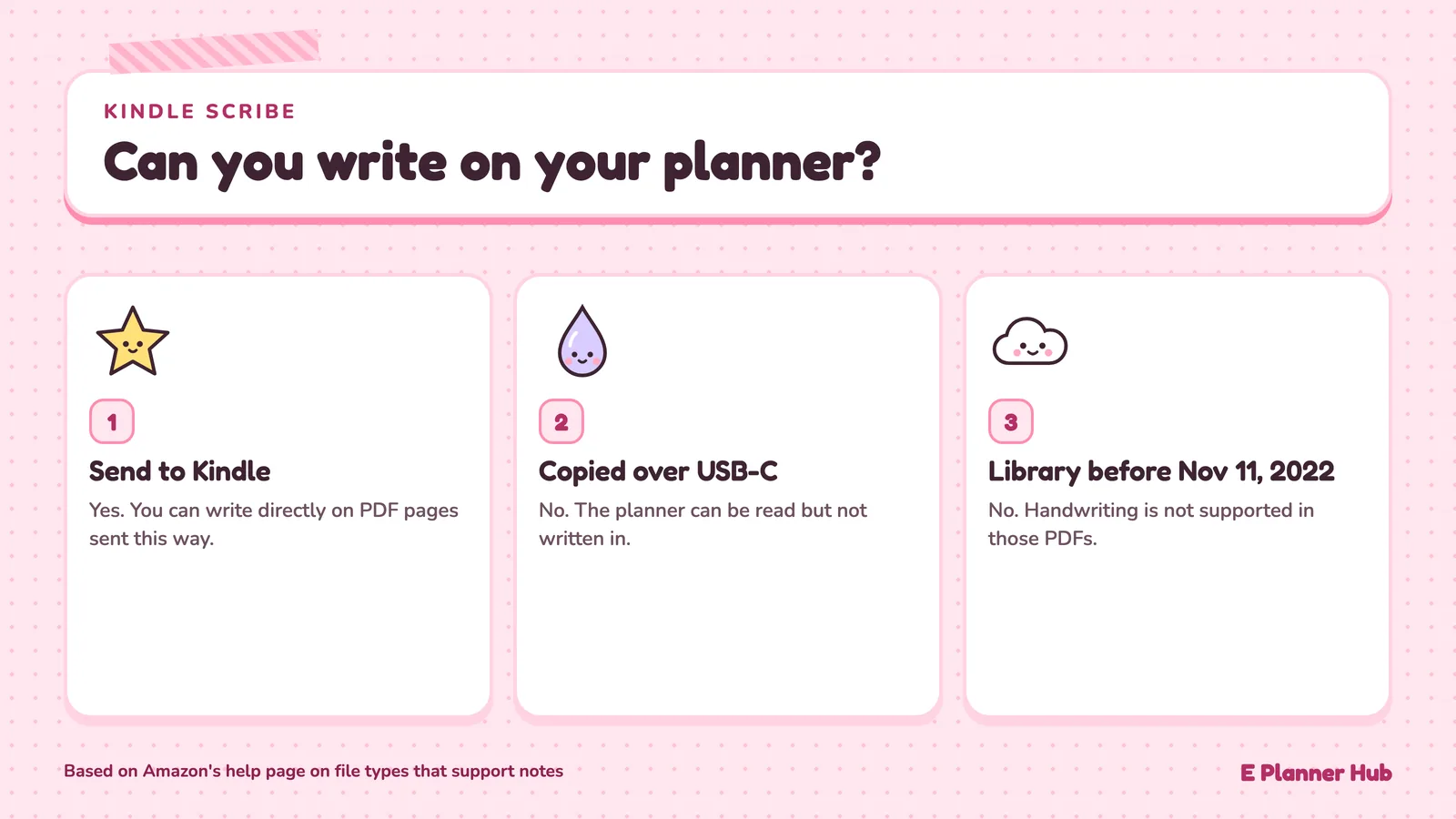
The detail planners need to know is how PDFs get onto the device. Amazon’s help page on file types that support notes says you can write directly on PDF pages sent through Send to Kindle, but handwriting is not supported in PDFs loaded over USB-C or sent to your library before November 11, 2022. A planner copied over a cable can be read but not written in.
It doubles as a full Kindle e-reader. Amazon’s announcement gives no single U.S. price, so check the Kindle Scribe store page for current pricing.
9. Supernote Manta (Supernote) #
Contents ↑Screen: 10.7-inch e-ink, 300 PPI | Stylus: sold separately | Works with: PDF, EPUB, Supernote notes
The Supernote Manta is a monochrome e-ink notebook with a 10.7-inch screen at 300 PPI and a weight of about 375 grams with its pen loop. Supernote lists support for PDF, EPUB, Word and its own note format, so a PDF planner imports directly.
Two things stand out for planners. The 300 PPI screen is sharper than the 226 PPI of the reMarkable Paper Pure, which helps with fine grid lines and small text in a dense monthly layout. Supernote also designs the device for user repair, with a teardown guide for replacing the battery and motherboard.
The box contents are the drawback. According to the Manta product page, the box holds the device, a USB cable and pen loops, but no pen, so the stylus is a separate purchase. As of November 2026, the Manta is listed at $505 on Supernote’s store before the pen.
10. BOOX Note Air6 C (BOOX) #
Contents ↑Screen: 10.3-inch color e-ink | Stylus: BOOX Pen3, included in the standard bundle | Works with: Google Play apps, built-in notes, PDF
The BOOX Note Air6 C runs Android 16 with the Google Play Store built in, so you can install a PDF annotation app alongside the built-in notes. The 10.3-inch Kaleido 3 color screen shows 300 PPI in black and white and 150 PPI in color, and the device weighs about 440 grams.
Black text and grid lines stay sharp, but colored tabs and stickers render at half the pixel density, so they look softer than on an iPad. The Pen3 offers 4,096 levels of pressure and tilt sensitivity.
E-ink also refreshes more slowly than an LCD, so apps designed for LCD tablets can feel less responsive. As of November 2026, the standard bundle is listed at $579.99 on BOOX’s U.S. shop.
Honorable Mentions #
Contents ↑reMarkable Paper Pro Move: a 7.3-inch color e-ink tablet that reMarkable launched on September 3, 2025, weighing 230 grams and starting at $449 on reMarkable’s store as of November 2026. It misses the main list because weekly spreads get too small on a 7.3-inch screen.
Kindle Scribe Colorsoft: Amazon’s first color Kindle Scribe, announced with the 2025 lineup, with 10 pen colors and 5 highlighter colors. Its planner workflow matches the Kindle Scribe, so the monochrome model represents both.
Supernote Nomad: a 7.8-inch Supernote listed at $359 and about 266 grams. Like the Paper Pro Move, it suits daily pages more than weekly spreads.
Galaxy Tab S11 Ultra: the 14.6-inch sibling of the Tab S11, launched in the same Galaxy Tab S11 series with an S Pen in the box. Its size makes it a desk device more than a daily planner.
Best Tablets for Digital Planning at a Glance #
Contents ↑The table lists the ten main picks with prices read from each maker’s store, as of November 2026. If you are still choosing the best tablet for digital planning, compare the stylus column first.
| Tablet | Screen | Stylus in box | Planner software | Starting price |
|---|---|---|---|---|
| iPad (A16) | 11-inch LCD | No | Goodnotes, Notability, App Store | $449 |
| iPad Air (M4) | 11 or 13-inch LCD | No | Goodnotes, Notability, App Store | $749 |
| iPad Pro (M5) | 11 or 13-inch | No | Goodnotes, Notability, App Store | $1,199 |
| iPad mini (A20 Pro) | 8.5-inch | No | Goodnotes, Notability, App Store | $699 |
| Galaxy Tab S11 | 11.0-inch AMOLED | Yes, S Pen | Samsung Notes, Google Play | $999.99 |
| reMarkable Paper Pro | 11.8-inch color e-ink | Yes, Marker | reMarkable’s own | $629 |
| reMarkable Paper Pure | 10.3-inch e-ink | Yes, Marker | reMarkable’s own | $399 |
| Kindle Scribe | 11-inch e-ink | Yes, pen | Amazon’s own | See Amazon |
| Supernote Manta | 10.7-inch e-ink | No | Supernote’s own | $505 |
| BOOX Note Air6 C | 10.3-inch color e-ink | Yes, Pen3 (standard bundle) | BOOX notes, Google Play | $579.99 |
What These Tablets Have in Common #
Contents ↑Side by side, four patterns decide the best tablet for digital planning more than any single spec.
The stylus is either in the box or a second purchase
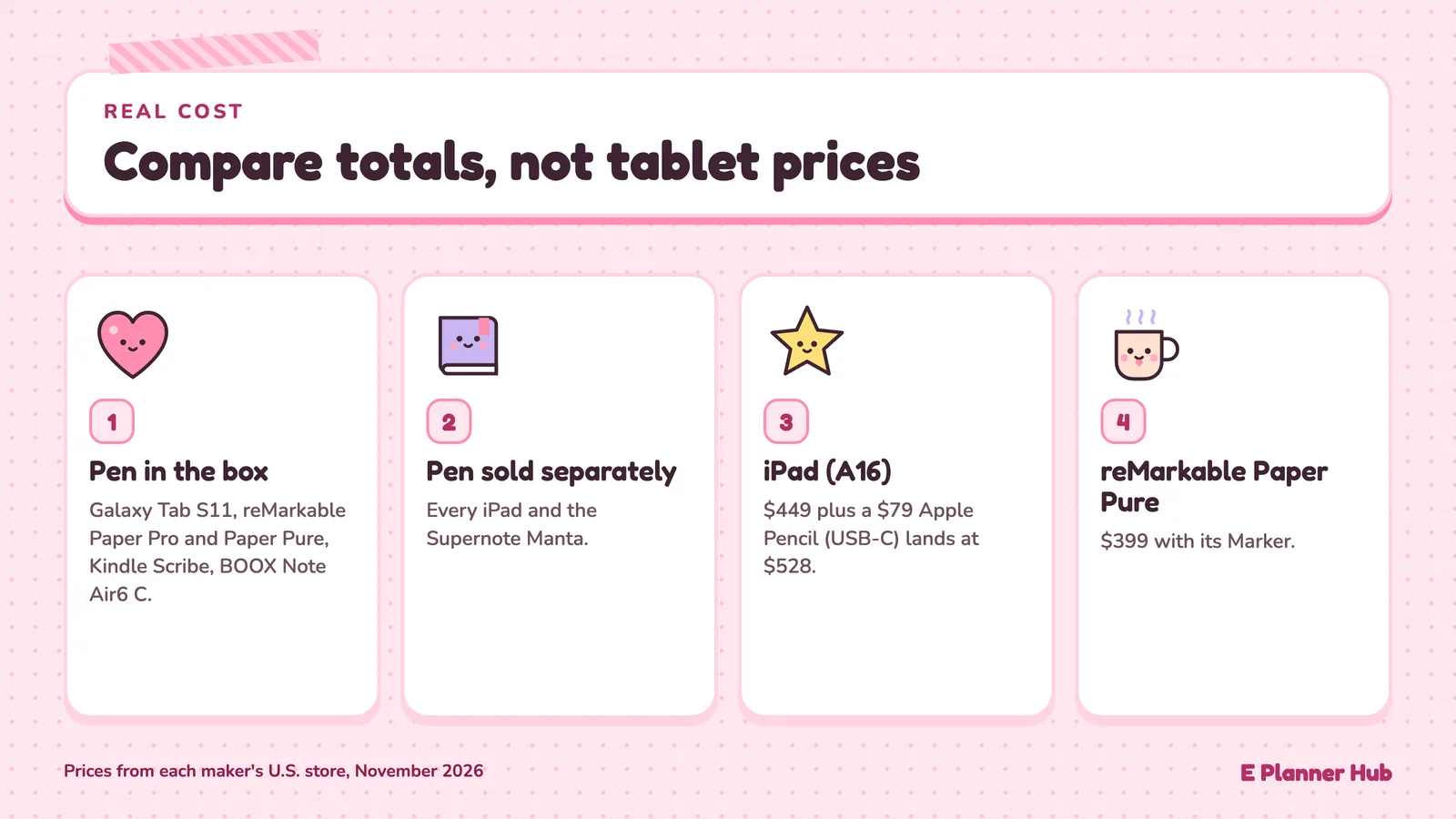
The Galaxy Tab S11, reMarkable Paper Pro, reMarkable Paper Pure, Kindle Scribe and BOOX Note Air6 C all include a pen. Every iPad and the Supernote Manta do not. That shifts the real price order: an iPad (A16) at $449 plus a $79 Apple Pencil (USB-C) lands at $528, above the reMarkable Paper Pure at $399 with its Marker. Compare totals, not tablet prices.
Hyperlinks depend on software, not hardware
Whether a tab jumps to the right page is decided by software. On iPad, Goodnotes opens links in imported PDFs, and its Read Only Mode avoids accidental strokes. reMarkable added PDF navigation links in a 2021 software update. The Kindle Scribe adds its own rule: a planner must arrive through Send to Kindle before you can write on it. Test a sample hyperlinked PDF on the exact device and app before you commit.
Color on e-ink costs sharpness or weight
The BOOX Note Air6 C shows color at 150 PPI against 300 PPI for black and white, so colored tabs look softer than text. The reMarkable Paper Pro is listed at 229 PPI but weighs 525 grams against 360 grams for the monochrome Paper Pure. If your planner relies on color coding, an iPad Air still shows it more clearly than any e-ink screen in this list.
Screen size decides the layout, not the other way round
The iPad mini at 8.5 inches and the honorable mentions at 7.3 and 7.8 inches all push you toward daily or vertical pages. The 13-inch iPad Air, 11.8-inch reMarkable Paper Pro and 11-inch Kindle Scribe handle a full weekly spread. Pick the layout first, then the screen.
Prices are as of November 2026 and change often, so check the manufacturer’s store before you buy. Features vary by app version and device; check the developer’s support page for your setup.
Frequently Asked Questions #
Contents ↑Which tablet is best for a hyperlinked PDF planner?
An iPad with Goodnotes or Notability opens planner tabs with a tap, and the iPad Air (M4) adds a laminated 13-inch option. On e-ink, the reMarkable Paper Pro and Paper Pure support internal PDF navigation links. Test a sample planner on any device before buying a full one.
Which planning tablets include a stylus?
The Galaxy Tab S11, reMarkable Paper Pro, reMarkable Paper Pure, Kindle Scribe and BOOX Note Air6 C standard bundle include a pen. Every iPad and the Supernote Manta need the stylus bought separately, which adds to the real cost.
What is the lightest tablet for carrying a planner every day?
Among the main picks, the iPad mini (A20 Pro) is lightest at 255 grams, followed by the reMarkable Paper Pure at 360 grams and the Supernote Manta at about 375 grams with its pen loop. The 13-inch iPad Air is heaviest at 616 grams.
Can I use Goodnotes on an e-ink tablet?
Goodnotes lists Apple devices, Android, Windows and the web as its platforms, so reMarkable, Kindle Scribe and Supernote Manta owners work in each maker’s own software. The BOOX Note Air6 C runs Android 16 with Google Play, which makes Android annotation apps an option there.